

How to check the status of a Spanish immigration application
Before starting the procedure: requirements and procedures may change. Check the information applicable to your case and consult the relevant official sources.
Checking the status of a Spanish immigration application is one of the most common tasks after submitting an application for residence, renewal, arraigo, family reunification, a return authorization, a change of authorization or any other procedure to an Immigration Office.
This guide explains how to check your immigration application online, by SMS and by phone, what information you need, what each status means, what to do if your status says “additional action required”, “approved”, “archived” or “the requested information could not be found”, and how to avoid errors that could delay your application.
Quick summary
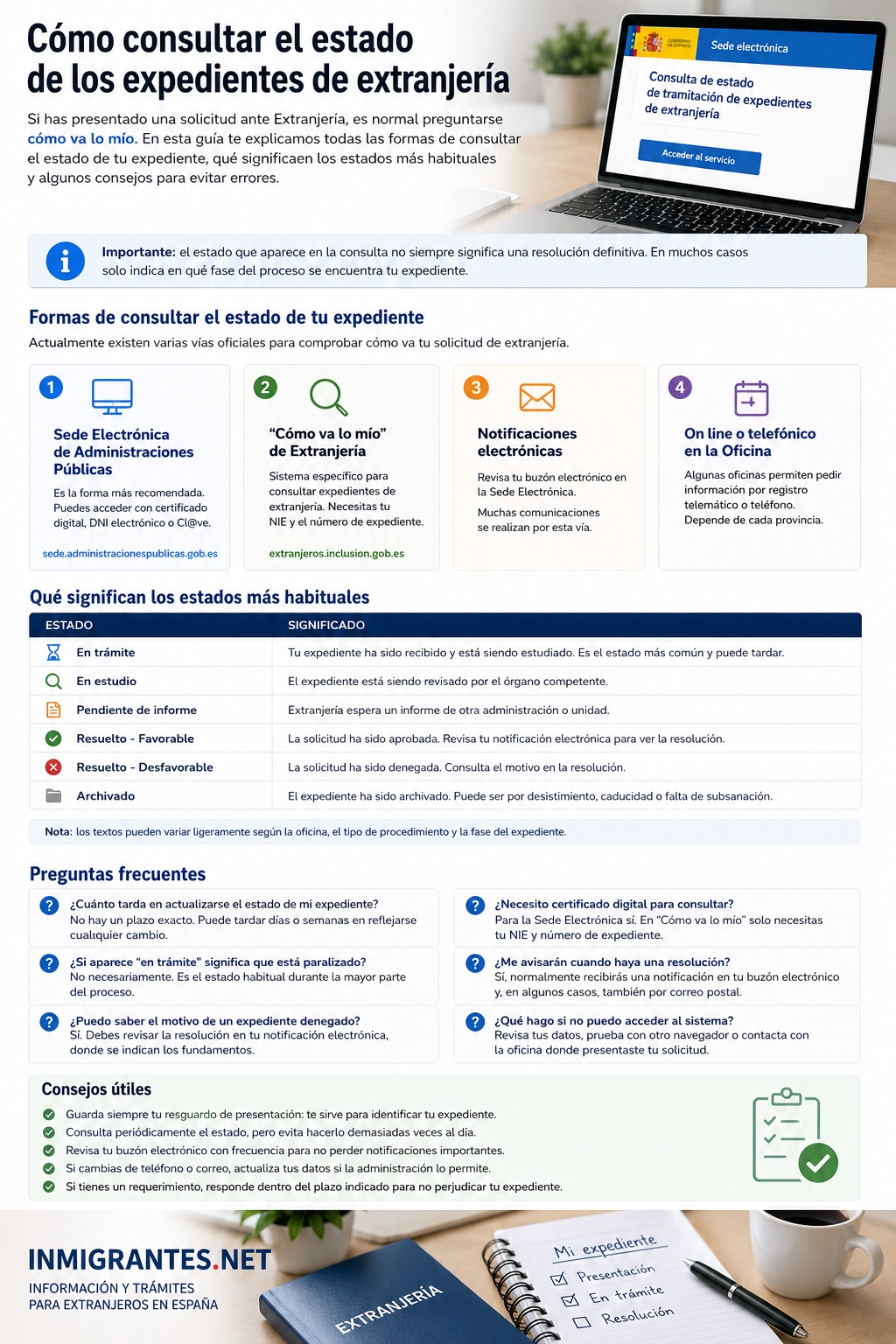
Ways to check an immigration application
Important: This service is intended for immigration applications handled by Immigration Offices. If your application is for Spanish citizenship, you should normally check it through “Cómo va lo mío” on the Ministry of Justice website, not through the general immigration application system.
[toc]
What is the status of an immigration application?
When you submit an immigration application, the Administration opens an administrative case. It goes through different stages: registration, review, requests for reports, requests for documents, a decision, notification or archiving.
The status of an immigration application is the message you see when you check how your application is progressing. It may not provide all the details, but it can tell you whether your application is still being processed, whether a decision has been made, whether documents are missing or whether there is an issue.
This check is useful for procedures such as arraigo social (social-integration residence route), arraigo familiar (family-based residence route), temporary residence, family reunification, long-term residence, work authorizations, renewals, changes of authorization or extensions of stay.
How to check your immigration application online
The easiest way is to check online through the Government Administrations’ Electronic Office. You can access the system using electronic identification or by completing a form with your application details.
Steps to check online
- Go to the official page for checking immigration applications.
- Choose whether to sign in with Cl@ve or use the form.
- Enter the requested details: NIE, application reference number, submission date or year of birth, depending on the method you choose.
- Check that there are no errors in the letters, numbers or dates.
- Click Check and review the status displayed.
- Save a screenshot or note down the status and the date you checked it if you need to follow up.
Details you need to check your application
Before checking, it is a good idea to have your application documents to hand. Depending on how you access the system, you may be asked for some of the following details:
- NIE, if you have already been assigned a Foreigner Identification Number.
- Application reference number, usually 15 characters long.
- Application submission date.
- Applicant’s year of birth.
- First and last names as they appear on the application.
- Proof of submission, especially if the application does not appear yet.
Related guides
If you are following up on a specific procedure, these pages may also be helpful:
How to check your immigration application by SMS
You can also check your application status by SMS. This is a convenient option if you do not have internet access at the time or want a quick reply with basic information.
| Type of check | What to write | Example |
|---|---|---|
| Check by NIE | NIE + space + your full NIE | NIE X00000111L |
| Check by application reference number | EXPE + space + application reference number | EXPE 280020101234567 |
Send the message to the official number provided by the Electronic Office for this service. The NIE must start with X, Y or Z, contain 8 digits and end with a letter. If the number has fewer digits, add zeros at the beginning.
Tip: check the spaces carefully. There must be a space between NIE or EXPE and the number. If the application reference number is not exactly 15 characters long, the system may return an error.
How to check your application status by phone
Checking by phone can be useful if you cannot access the online service or need to confirm basic information. The Government online portal states that you can obtain information by calling the telephone number provided for checking application status.
Keep in mind that the information provided through this service is for guidance only. For important actions, such as responding to a request for additional documents, appealing a decision or submitting documents, always check the official notification.
Have these details ready before you call
- Your NIE or application reference number.
- The applicant’s first and last name.
- Date of birth.
- Date you submitted the application, if you have it.
- Type of application submitted: arraigo (a Spanish residence route based on ties to Spain), renewal, family reunification, long-term residence, etc.
What each Spanish immigration application status means
The system may display different statuses. Some are straightforward, while others can be confusing. This table will help you understand the most common ones:
| Status | What it means | What to do |
|---|---|---|
| In progress | The application is being reviewed and no decision has been made yet. | Wait and check the status and notifications regularly. |
| Additional documents required | The authorities need additional documents or clarification. | Check the official notification and submit the requested documents within the deadline. |
| Approved | The application has been approved. | Wait for the notification and check whether you need to book an appointment for fingerprinting or your TIE. |
| Refused | The application has been refused. | Read the decision and consider an appeal or a new application, depending on the circumstances. |
| Archived | The procedure may have been closed because documents were not submitted, the application was withdrawn or for another administrative reason. | Check your notifications and act quickly if an appeal or submission of missing documents is possible. |
| Under appeal | An appeal has been submitted and is being processed by the authorities. | Keep the proof of submission for your appeal and wait for a decision. |
| No information found | The details do not match, or the application has not yet been entered into the system. | Check the details and try again in a few days. |
What to do if your status says “additional documents required”
If your application status says additional documents required, this does not necessarily mean it has been refused. It usually means the Administration needs you to submit a document, correct an error or clarify some information.
Recommended steps
- Check your electronic notifications or see whether you have received an official communication.
- Read carefully which document or information you are being asked to provide.
- Check the deadline for responding.
- Prepare the documents in the correct, legible and up-to-date format.
- Submit your response through the specified channel: the government online portal, an official registry or another authorised channel.
- Always keep proof of submission.
What to do if your status says “approved”
If your application status says approved, your application has, in principle, been approved. However, you should wait for or download the official decision, as this document will specify its effects, dates, conditions and next steps.
In many cases, after a positive decision you will need to book an appointment for fingerprinting and the issuance of your Foreigner Identity Card (TIE), if applicable. You will usually need to bring the decision, your passport, a photograph, proof of municipal registration if required, and the relevant fee.
After a positive decision
What to do if your application does not appear
If the system displays a message saying that the requested information could not be found, it does not always mean there is a serious problem. The details may have been entered incorrectly, or the application may not yet have been added to the computer system.
- Check that the NIE is entered with the first and last letters in uppercase.
- Check that the application reference number has 15 characters.
- Check the submission date and year of birth.
- Do not confuse an immigration application with a citizenship application.
- Wait a few days if you have just submitted your application.
- If the error persists, contact the relevant Immigration Office or check your proof of submission.
How long does it take to process an immigration application?
Processing times depend on the type of procedure, the province, the office’s workload and whether the application is complete. Processing times vary for arraigo (a residence route based on ties to Spain), renewals, family reunification, changes to a residence authorization and long-term residence.
The process may also take longer if the Administration requests additional documents. That is why it is important to check your application status and electronic notifications regularly.
Factors that may delay an application
- Expired or incomplete documents.
- Missing sworn translation or apostille/legalisation.
- Errors in personal details.
- Requests for additional documents not answered on time.
- The provincial office’s workload.
- The need for reports from other government bodies.
General guidance
Has your application been asked for additional documents, archived or refused?
If you don’t understand your application status or need to know what to do next, you can seek guidance before the deadline passes.
Common mistakes when checking your application status
Many status checks fail because of small data-entry errors. Before assuming there is a problem with your application, check the following:
- Entering the NIE incorrectly or substituting one letter for another.
- Not adding leading zeros when the NIE has fewer than 8 digits.
- Entering an incomplete application reference number.
- Using details from an earlier application.
- Checking too soon after submitting the application.
- Confusing the immigration system with the Spanish citizenship system.
- Not checking official notifications even when the status still appears unchanged.
Frequently asked questions about checking immigration application status
How can I check the status of my immigration application?
You can check it online through the Government Administrations’ Electronic Office, using Cl@ve or a form; by SMS using your NIE or EXPE; or by phone using the number provided for application-status enquiries.
What information do I need to check my application status?
Depending on the method you use, you will usually need your NIE, application reference number, submission date, year of birth or an electronic identification system such as Cl@ve.
How do I check by SMS?
You can send an SMS with the word NIE followed by a space and your NIE, or with the word EXPE followed by a space and your application reference number. The application reference number must contain exactly 15 characters.
What does “in progress” mean?
It means the application is still awaiting review or a decision. No final decision has been made yet, so you should continue checking and look out for any notifications.
What does “additional documents required” mean?
It usually means the authorities need additional documents or clarification. Check the official notification and respond within the stated deadline.
What does “approved” mean?
It means your application has been approved. You should then check the official decision and see whether you need to book an appointment for fingerprinting, TIE issuance or another subsequent step.
What should I do if my application does not appear?
First, check that the details you entered are correct. If you have only just submitted your application, it may not yet have been entered into the system. If several days pass and it still does not appear, contact the relevant Immigration Office.
Is checking an immigration application the same as checking a citizenship application?
No. Immigration applications can be checked through the Government Administrations portal. Spanish citizenship applications based on residence are usually checked through the Ministry of Justice’s “Cómo va lo mío” system.
Final note: The status shown in the check is for information purposes only. To find out about deadlines, requests for additional documents, appeals or the actual effects of a decision, always check the official notification for your application.
This content is for informational purposes only and does not replace professional legal advice or information provided by the competent authorities.